
how we built pacepilot: a voice-first AI running coach powered by Google
ever tried talking to your phone mid-run? yeah, it's terrible. your hands are sweaty, you're gasping for air, and siri thinks "what's my pace" means "call grace." we wanted to fix that — build a running coach that actually listens, talks back intelligently, and knows your heart rate before you do.
pacepilot is a voice-first AI running coach. you talk to it like a real coach. it talks back. it knows your training plan, your heart rate, your pace zones, and whether you're slacking on your long runs. no screens. no tapping. just voice.
here's how we built it — and why google's AI stack was the backbone of the whole thing.
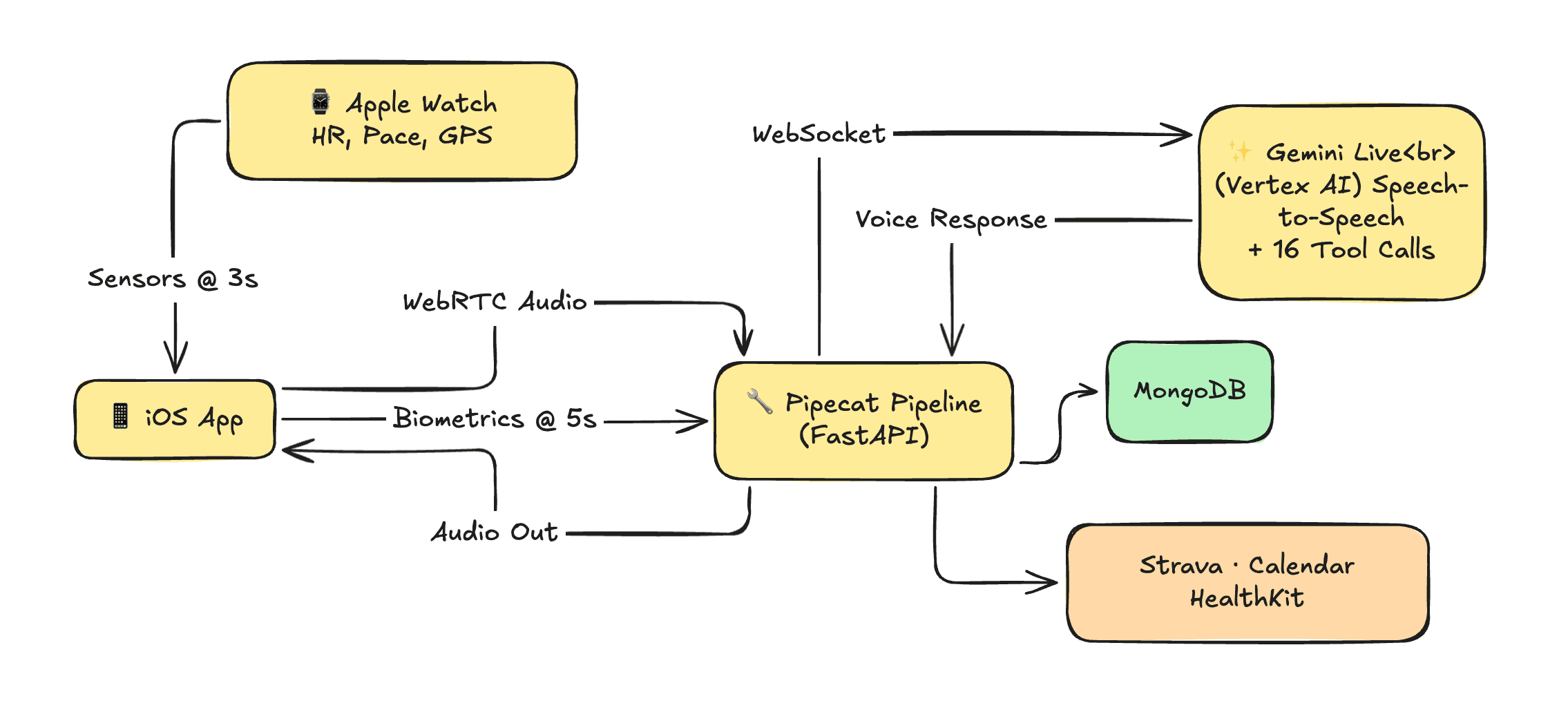
the core idea
most running apps treat voice as an afterthought. a robotic "you have completed one kilometer" every few minutes. we wanted something fundamentally different: a conversational coach that could hold context across an entire run, respond to natural speech in real-time, and make decisions based on live biometric data.
that meant we needed three things:
- a model that could process and generate natural audio in real-time
- a way to pipe live sensor data into the conversation without the runner asking
- tool-calling so the AI never hallucinates your pace (because telling someone they're running 4:30/km when they're actually doing 6:00/km is... not great coaching)
why gemini live
we evaluated a bunch of options. the decision came down to one thing: native audio understanding.
gemini live doesn't do speech-to-text → LLM → text-to-speech. it processes audio natively — understands tone, breathing patterns, the urgency in your voice when you say "i think i'm going too fast." that latency difference matters when someone is mid-sprint and needs immediate feedback.
we're running gemini-2.5-flash-native-audio on vertex AI. flash, not pro — because at the edge of a voice conversation, speed beats raw capability every time. the model is fast enough that responses feel like talking to a human, not waiting for a chatbot.
the voice? aoede. we tested a few options and aoede had the right energy — encouraging without being annoying, calm without being monotone. (sounds like a small detail. it's not. you're going to hear this voice for 45 minutes on a tempo run. it better not make you want to throw your phone.)
the architecture (server-side, on purpose)
here's where it gets interesting. the iOS app never talks to gemini directly.
iPhone (mic + sensors)
    → WebRTC (Daily.co)
        → Python server (Pipecat)
            → Gemini Live (Vertex AI)
                → back through the same pipe
why server-side? three reasons:
-
credentials stay off the device. your GCP project ID and service account key never touch the phone. one reverse-engineered IPA and your billing account is toast — not worth the risk.
-
tool execution happens server-side. when gemini calls
get_current_biometrics, that tool handler hits our mongodb, checks the biometric store, and returns real data. can't do that from an iOS sandbox without shipping your entire backend as an SDK. -
we control the pipeline. want to swap models? change a string. want to add a new tool? register a function. want to inject context mid-conversation? push a frame. the server is the brain; the phone is the mouth and ears.
pipecat: the orchestration layer
pipecat is what ties everything together. it's an open-source framework for building voice AI pipelines, and it has first-class support for both daily (webrtc transport) and gemini live (LLM service).
our pipeline looks like this:
pipeline = Pipeline([
    transport.input(),           # audio from runner's phone
    context_aggregator.user(),   # maintains conversation history
    llm,                         # gemini live on vertex AI
    context_aggregator.assistant(),
    transport.output(),          # audio back to runner's phone
])
five lines. that's the core voice loop. audio in → gemini processes → audio out. pipecat handles frame routing, VAD (voice activity detection), and the websocket connection to vertex AI.
but the interesting stuff is what happens around this loop.
google cloud: the foundation
everything runs on google cloud. here's the stack:
vertex AI — gemini live connects via websocket through vertex AI's platform API. we authenticate with a GCP service account (roles/aiplatform.user), and pipecat's GeminiLiveVertexLLMService handles token refresh automatically. tokens expire every hour; the service regenerates them transparently. zero downtime, zero manual rotation.
llm = GeminiLiveVertexLLMService(
    credentials=settings.GOOGLE_APPLICATION_CREDENTIALS_JSON,
    project_id=settings.GCP_PROJECT_ID,
    location=settings.GCP_REGION,  # us-central1
    model="google/gemini-live-2.5-flash-native-audio",
    voice_id="Aoede",
    system_instruction=system_prompt,
    tools=tools,
)
that's the entire model initialization. project ID, region, credentials, model name, voice, system prompt, tools. vertex AI handles the rest — scaling, availability, the websocket lifecycle.
authentication flow — we support both inline JSON credentials (GOOGLE_APPLICATION_CREDENTIALS_JSON) and file path (GOOGLE_APPLICATION_CREDENTIALS). inline takes precedence. this matters for deployment — you don't want to mount secret files in containers when you can inject them as environment variables.
the tool-calling system (this is the important part)
here's our philosophy: the AI never guesses biometrics. ever.
every system prompt explicitly says: "do not estimate, infer, or hallucinate any biometric data. always use tool calls." if a runner asks "what's my heart rate?" gemini must call get_current_biometrics. no exceptions.
we have 16 tools registered with gemini:
| domain | tools |
|---|---|
| biometrics | get_current_biometrics, get_run_progress |
| training | get_todays_workout, get_plan_status, generate_training_plan, reschedule_workout |
| history | get_recent_runs, get_personal_records, get_weekly_stats |
| social | get_friend_activity, get_leaderboard_position |
| calendar | schedule_run_to_calendar |
| races | find_local_runs |
| user | update_user_profile, mark_not_feeling_well |
but here's the kicker — not all tools are available all the time. during an active run, only 4 tools are enabled: biometrics, run progress, today's workout, and the "not feeling well" escape hatch. why? latency. mid-run, you don't want gemini thinking about whether to check your friend's strava activity. keep the decision space small, keep the response fast.
tool handlers are async python functions that hit mongodb via our repository pattern:
async def handle_get_current_biometrics(session_id: str, **kwargs):
    snapshot = await biometric_store.get(session_id)
    return {
        "heart_rate_bpm": snapshot.heart_rate,
        "pace_seconds_per_km": snapshot.pace,
        "distance_km": snapshot.distance,
        "elapsed_seconds": snapshot.elapsed,
    }
gemini calls the tool → handler executes → result goes back to gemini → gemini incorporates it into its spoken response. the runner never knows a function call happened. they just hear "you're at 162 bpm, maybe ease off a bit on this hill."
biometric streaming: the real-time layer
the iOS app streams sensor data to the server every 5 seconds:
POST /api/voice/biometrics
{
    "sessionId": "...",
    "heartRate": 158.0,
    "paceSecondsPerKm": 312.5,
    "distanceKm": 3.42,
    "elapsedSeconds": 1065
}
heart rate comes from HealthKit (apple watch), pace and distance from CoreLocation GPS. the server stores this in an in-memory BiometricStore — a thread-safe dict protected by asyncio.Lock. no database round-trip for real-time reads. sub-millisecond access when gemini's tools need current data.
why in-memory? because a tool call during a run needs to return in milliseconds, not hundreds of milliseconds. the tradeoff is single-server state — but for a voice session that's pinned to one server anyway, it's the right call.
proactive coaching (the server evaluates first)
we don't just wait for the runner to ask questions. every 120 seconds, a background loop checks the biometric store for notable events:
- heart rate spike: HR ≥ 180 bpm? the coach speaks up.
- distance milestones: hit 5km? you'll hear about it.
but here's the design choice that matters: the server evaluates before sending anything to gemini. we don't inject "here's the latest biometrics" every 2 minutes and burn tokens. we check if something is actually worth mentioning. if HR is normal and you haven't hit a milestone — silence. good coaching knows when to shut up.
when something is worth flagging:
prompt = "[COACHING ALERT] Current data (do NOT call tools): HR 183bpm, pace 4:45/km, distance 5.0km, elapsed 23:30"
await task.queue_frame(InputTextRawFrame(text=prompt))
injected directly into the conversation as a text frame. gemini responds with one brief coaching cue. no tool call needed — the data is right there in the prompt.
pace zones: daniels' VDOT, not vibes
training plans need pace zones. we could have used generic "easy/medium/hard" buckets, but we implemented daniels' running formula instead — the same system elite coaches use.
give us a benchmark race (say, a 25-minute 5K) and our PaceCalculator will:
- calculate your VDOT (a VO2max proxy) from the race result
- derive five pace zones: easy (65% VDOT), marathon (79%), threshold (86%), interval (97%), repetition (107%)
- generate heart rate zones using the karvonen method from your resting and max HR
these zones feed into training plan generation, workout prescriptions, and real-time coaching feedback. when gemini says "you're running too fast for an easy day" — it's comparing your current pace against a scientifically derived zone, not a guess.
session types: one model, five personalities
the same gemini model behaves completely differently depending on context:
- onboarding: chatty, asks lots of questions, collects profile data through conversation
- pre_run: coaching Q&A, reviews today's workout, answers training questions
- active_run: minimal. only speaks when spoken to or when something's wrong. (nobody wants a chatty coach at kilometer 15 of a long run)
- post_run: reviews the run, gives feedback, suggests recovery
- replan: collaborative plan creation dialogue
each session type swaps the entire system prompt and tool availability. same model, same pipeline, completely different behavior. vertex AI doesn't care — it processes whatever system instruction we send.
the iOS side
the phone's job is simple: collect sensor data, stream audio, display minimal UI.
voice session lifecycle:
- app sends
POST /api/voice/sessionwith session type - server creates a daily.co room, spawns the pipecat pipeline, returns room URL + client token
- app joins the room via daily's iOS SDK
- audio flows bidirectionally over webrtc
- biometrics stream every 5 seconds via REST
- on session end,
POST /api/voice/end— server saves transcript, clears state
the apple watch adds another layer — streaming HR and GPS to the phone every 3 seconds via watchconnectivity, which the phone aggregates and forwards to the server. the watch also receives haptic triggers back (pace alerts, interval transitions).
what google's stack gave us
let me be specific about what would have been significantly harder without google's AI and cloud infrastructure:
gemini live's native audio processing eliminated the speech-to-text → LLM → text-to-speech chain. that's easily 2-3 seconds of latency we didn't have to optimize around. for a running coach, that's the difference between useful real-time feedback and annoying delayed responses.
vertex AI's managed infrastructure meant we didn't build auth token management, websocket lifecycle handling, or model serving infrastructure. pipecat's vertex AI integration handles all of it — we configure, it connects.
tool calling in gemini is what makes this a coach instead of a chatbot. the model decides when it needs data, calls the right function, gets structured results, and weaves them into natural speech. 16 tools, zero hallucinated biometrics.
the flash model's speed is non-negotiable for voice. we tested with pro — responses were better but noticeably slower. for a voice conversation during physical activity, latency is the enemy. flash on vertex AI gave us the speed we needed without sacrificing the conversational quality.
what's next
we're working on post-run analysis using gemini's longer context — feeding full biometric timeseries and GPS tracks into a post-run debrief that can say things like "your pace dropped 15% in the last 2km, but your heart rate was stable — that's likely mental fatigue, not fitness." that kind of insight requires processing thousands of data points, which is where gemini's context window really shines.
also exploring multi-modal inputs — training photos, route screenshots, race results images — all native to gemini's capabilities.
the git logs don't lie: this project moved fast because the infrastructure got out of our way. google's AI stack handled the hard parts (real-time audio AI, tool orchestration, managed serving), and we got to focus on what actually matters — building a coach that makes runners faster.
built with gemini live on vertex AI, pipecat, daily.co, and a lot of interval training.